Porodo TF Card Reader PDETK19BK - OTG Lightning, 480Mbps, Black
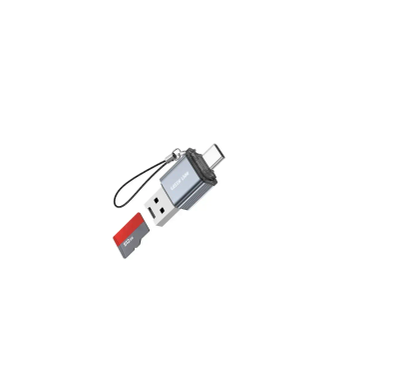
Green Lion TF Card Reader GN4N1TCCARRGY - 4-in-1, 2TB Support, Grey
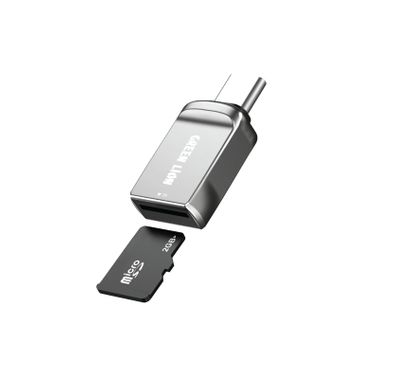
Green Lion Micro SD Card Reader GN2N1MISDCDGY - Type-C & USB-A, 2TB, Grey
Green Lion 3-in-1 SD Card Reader GN3N1RDUBLGGY - USB-C & Lightning, Grey
Green Lion Micro SD Card Reader GN3N1RDUBTCGY - 3-in-1, USB-C & USB-A, Grey
Porodo Card Reader PBCACRHBK - 2-in-1, Dual USB Type-C & USB 3.0, Black
FAQ
How do I choose the right storage capacity and speed for my needs?
Choosing the right storage depends on what you plan to store and how you use your devices. For everyday documents and photos, 256GB to 512GB is usually enough, but for videos, games, or professional work, 1TB or more is better. Speed matters too: SSDs are much faster than HDDs, making them ideal for quick boot times and file transfers. If you edit videos or play games, go for NVMe SSDs for top speed. Always check your device’s compatibility before buying.What’s the difference between HDD, SSD, NAS, and flash drives?
HDDs (hard disk drives) are traditional storage with moving parts, usually cheaper but slower. SSDs (solid state drives) are faster, more durable, and better for performance, but cost more per GB. NAS (network attached storage) is a storage device connected to your network, great for sharing files between multiple devices or backing up data at home or office. Flash drives are portable and good for quick file transfers, but not ideal for long-term or large storage. Choose based on your speed, capacity, and sharing needs.How do I know if a storage device is compatible with my laptop, desktop, or gaming console?
Check the connection type your device supports—like SATA, NVMe (M.2), or USB. Laptops and desktops often have specific slots or ports, so check your device’s manual or specs online. For gaming consoles, only certain models and sizes are supported; for example, PlayStation 5 needs a specific NVMe SSD. If you’re unsure, search for your device model plus 'compatible storage' or ask our support team. Always double-check before buying to avoid returns.What should I look for in a router or mesh system for good network coverage and speed?
Look for routers or mesh systems that support the latest Wi-Fi standards, like Wi-Fi 6, for faster speeds and better coverage. Consider the size of your home—mesh systems are great for large or multi-story houses. Check the number of antennas and supported devices; more antennas usually mean better range. Also, see if it has features like parental controls, guest networks, and easy app setup. Reading reviews and checking brand reputation helps you avoid unreliable models.How important are security features like encryption and backup options in storage devices?
Security features are crucial, especially if you store sensitive data or personal files. Encryption protects your data if the device is lost or stolen, making it unreadable to others. Backup options help you recover files in case of hardware failure or accidental deletion. Many modern drives offer built-in encryption and backup software—look for these when buying. Investing in secure storage gives you peace of mind and protects your information.How do I compare price-to-performance when buying storage or networking devices?
Compare the cost per GB for storage devices and look at speed ratings (like read/write speeds for SSDs). For networking, check the maximum speed (Mbps or Gbps) and coverage area versus price. Sometimes paying a bit more for a reputable brand or better warranty is worth it for reliability. Read user reviews to see if the device performs as advertised. Always balance your budget with your actual needs—don’t overpay for features you won’t use.Is it easy to install and set up storage or networking devices myself?
Most modern storage and networking devices are designed for easy installation. External drives and USB devices are usually plug-and-play. Internal drives may require opening your device, but many laptops and desktops have accessible slots. Routers and mesh systems often come with step-by-step apps or guides. If you’re unsure, check online tutorials or ask Naml support for help. Taking your time and following instructions makes setup much smoother.How do I make sure my network device will work with my internet provider and existing hardware?
Check if the router or mesh system supports your internet connection type (like fiber, DSL, or cable). Some providers require specific settings or modems, so ask your provider or check their website for compatible models. Make sure your devices (phones, laptops, smart TVs) support the Wi-Fi standard of the new router. If you have smart home devices, check their compatibility too. Naml’s product pages often list supported providers and devices for your convenience.How do I back up my data reliably using storage devices?
Use an external hard drive or NAS for regular backups—set a schedule (like weekly or daily) using backup software. Many drives come with their own backup tools, or you can use built-in options like Windows Backup or Time Machine on Mac. For extra safety, keep a copy of important files in the cloud. Test your backups occasionally to make sure you can restore files if needed. Having both local and cloud backups protects you from hardware failure or accidental deletion.How do I choose a reliable brand or model for storage and networking devices?
Look for brands with a strong reputation and positive customer reviews, like Western Digital, Seagate, Samsung, or TP-Link. Check warranty terms—longer warranties usually mean more confidence in the product. Read expert reviews and see if the model has won any awards or recommendations. Avoid unknown brands with little information or poor support. At Naml, we only list trusted brands to help you shop with confidence.
Expert Advice for Choosing Storage & Networking Solutions
Why Storage & Networking Matter
Reliable storage and networking devices are the backbone of any modern digital setup. Whether you’re safeguarding precious memories, managing business data, or ensuring seamless connectivity at home, the right products can make your digital life smoother, safer, and more productive. Investing in quality solutions means less downtime, faster access, and peace of mind knowing your information is secure and accessible when you need it most.
Explore a World of Options
The Storage & Networking category offers a remarkable variety of devices to suit every need. From high-capacity external drives and cloud-enabled storage to advanced Wi-Fi routers and mesh systems, there’s a solution for every scenario. Leading brands like Anker, Lenovo, and Amazon bring innovative features and trusted reliability, ensuring you have access to the latest technology and performance.
The Challenge of Choosing
With so many options, selecting the right storage or networking device can feel overwhelming. Buyers often wonder about compatibility, speed, capacity, and security features. It’s common to be unsure whether to choose a portable SSD, a NAS system, or a cloud-based solution—or to debate between a basic router and a mesh network for whole-home coverage.
Key Considerations for Buyers
When shopping for storage and networking products, it’s important to consider your specific needs. Think about the amount of data you need to store, the speed requirements for your workflow, and the level of security you expect. For networking, assess the size of your space, the number of connected devices, and whether you need advanced features like parental controls or guest networks. Compatibility with your existing devices is also crucial.
Quality vs. Price: What to Expect
Price points in this category can vary widely. Entry-level devices offer basic functionality and are ideal for light users, while premium models from brands like Acer and Anker deliver faster speeds, greater capacity, and enhanced security. It’s wise to balance your budget with your performance needs—sometimes spending a bit more upfront can save you time and hassle in the long run.
Your Comprehensive Buying Guide
To help you navigate these choices, we’ve created The Ultimate Storage & Networking Buying Guide. This in-depth resource covers everything from understanding technical specs to comparing top brands and troubleshooting common issues. Whether you’re a first-time buyer or upgrading your setup, our guide is designed to empower you with the knowledge you need to make the right decision.
Why Shop with Naml?
At Naml, we curate our Storage & Networking collection with care, featuring only trusted brands like Lenovo, Amazon, and Anker. Our selection is tailored to meet the needs of both home users and professionals, and we offer fast, reliable delivery across the UAE. You can shop with confidence, knowing every product has been vetted for quality and performance.
Tips for First-Time Buyers
If you’re new to storage or networking, start by assessing your current and future needs. Don’t hesitate to reach out to our support team for personalized advice. Remember to check compatibility with your devices, and consider scalability if you expect your needs to grow. Reading reviews and consulting our buying guide can also help clarify your options.
Shop with Confidence
Choosing the right storage and networking devices is an investment in your digital wellbeing. Explore our curated collection, discover trusted brands, and take advantage of our expert resources. For a deeper dive into making the best choice, don’t miss our comprehensive buying guide. Shop with confidence at Naml—your digital life deserves nothing less.